
|
|
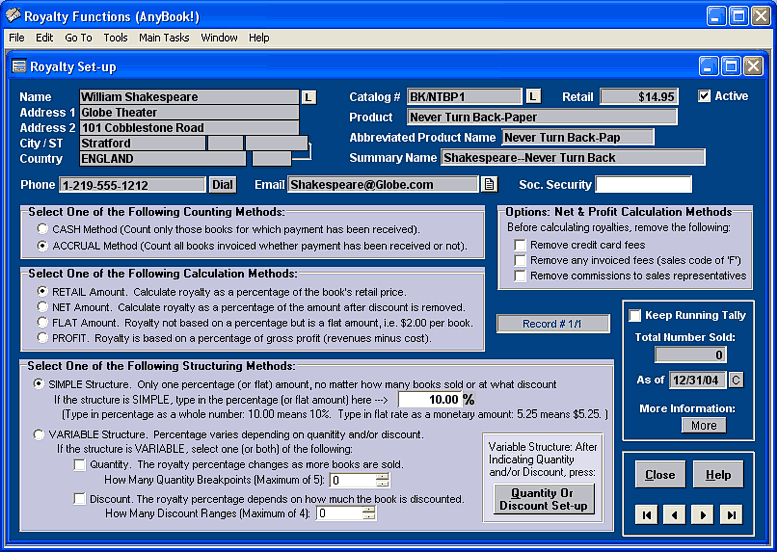
The Royalty Set-up Screen provides a wide range of options. Royalties can be based on cash or accrual accounting. They can be calculated on a percentage of the retail price, net sales, a flat amount, or based on profit. Royalties can also be set up to change depending on the quantity of books sold and/or depending on the discount at which books are sold. Over 237 different royalty combinations are available for nearly any royalty arrangement.
After you enter information on a royalty holder, you can generate a report. The next screen is a sample of a report...
Royalty Report Screen
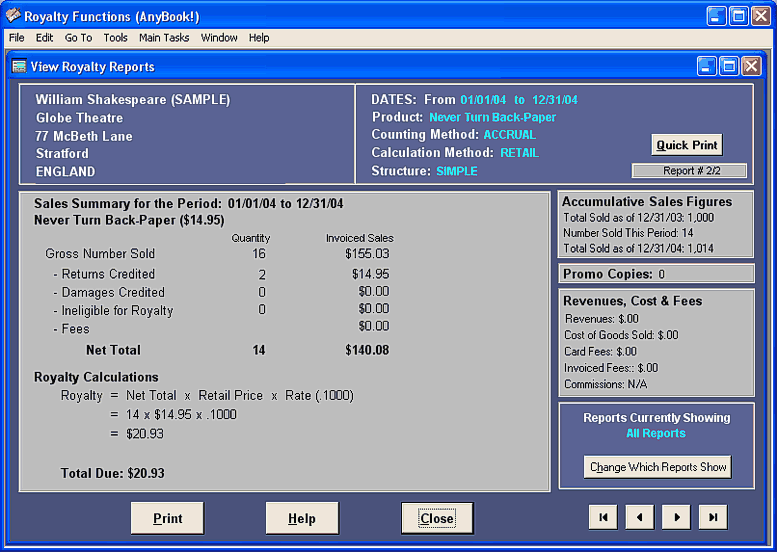
Royalty Report Screen . The screen display illustrated above is an example of a royalty report produced by AnyBook. The report provides you with all the important accounting details including the total number of books sold, returns, damages, etc. It also provides you with the amount of sales. The royalty formula and calculations are displayed along with the amount due to the author. The printed version of the report is designed so that it can be folded and inserted in a windowed business envelope.
Other Screen Images: Main Invoice Screen |
Return to Screen Display Index
AnyBook Home Page: AnyBook Home Page
AnyBook Home Page: AnyBook Home Page