
The information, below, is about AnyBook's Classic program, but we want you to know that we have released of a series of new programs: The Professional Series. For information on these new state-of-the-art programs, click here: AnyBook Professional Series
The Classic Series are older, 16-bit programs. No further development work is being done on Classic programs, but we are keeping them available as a low cost alternative for businesses . . .
AnyBook Classic Screen Images:
Sample Inventory Report | Sample from Billing Statements | Mark Paid Feature | Main Screen
Inventory
AnyBook! keeps track of your inventory so you know how many books are available at any given time. It tracks returns, damages, and promotional copies. It gives you the cost of beginning and ending inventories, average discount on copies sold, and gross profit for each book. It also tracks all consignment activity, a particularly valuable function if you work with consignment wholesalers and distributors.
Sample Inventory Report

Billings
One important aspect of owning a business is sending out monthly billing statements. A billing statement itemizes all of the customer's invoices and payments and calculates their balance due. AnyBook! provides a number of different functions dealing with billing statements. At any given time, you can prepare a statement and determine how much one or more of your customers owe. One of the nice features built into AnyBook, not available with other programs, is that all unpaid invoices are marked with an asterisk. It makes it very easy for you and your customer to track payments
Sample from Billing Statements

Keeping Track of Payments
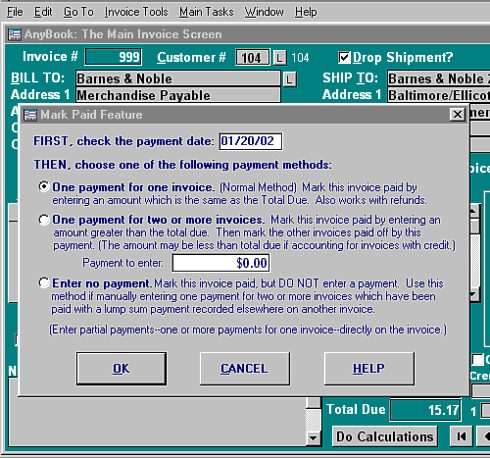
The Mark Paid Feature in AnyBook is one of the functions built into the program which sets it apart from other publishing and general accounting programs. It is designed to duplicate how people work in a real world situation. While such a method might not be important for large businesses with teams of accountants, small businesses want to keep track of individual invoices--and whether or not they are paid. A time-tested method of keeping track of invoices is to write (or stamp) "paid" on top of the invoice. Most computer software programs, however, don't use this system, rather relying on a separate payment register which is detached from invoices. The Mark Paid feature, however, keeps things simple by printing "PAID" in the Payment Box on the Invoice Screen and keeping invoices and payments together. You find it intuitive, easy to use, and a wonderfully simple way of recording and tracking payments.
Mark Paid Feature
Main Screen Image and Information
Other Screen Images:
Customer Contact Manager (Standard & Advanced Edition)
Royalty Set-up Screen (Advanced Edition)
AnyBook is another carefully crafted software program from:
 Great Rift Software
 Innovation, Excellence and Service